
Download ExactScan Pro – Fast, Secure OCR Scanning Software
Overview
ExactScan Pro is a premium image‑scanning solution designed for users who demand speed, accuracy, and a hassle‑free experience. Unlike many free alternatives that require manual driver installation and confusing setup wizards, ExactScan Pro automatically detects virtually any scanner attached to your computer. This “plug‑and‑play” capability eliminates the tedious search for compatible drivers, letting you start digitizing documents the moment you launch the program.
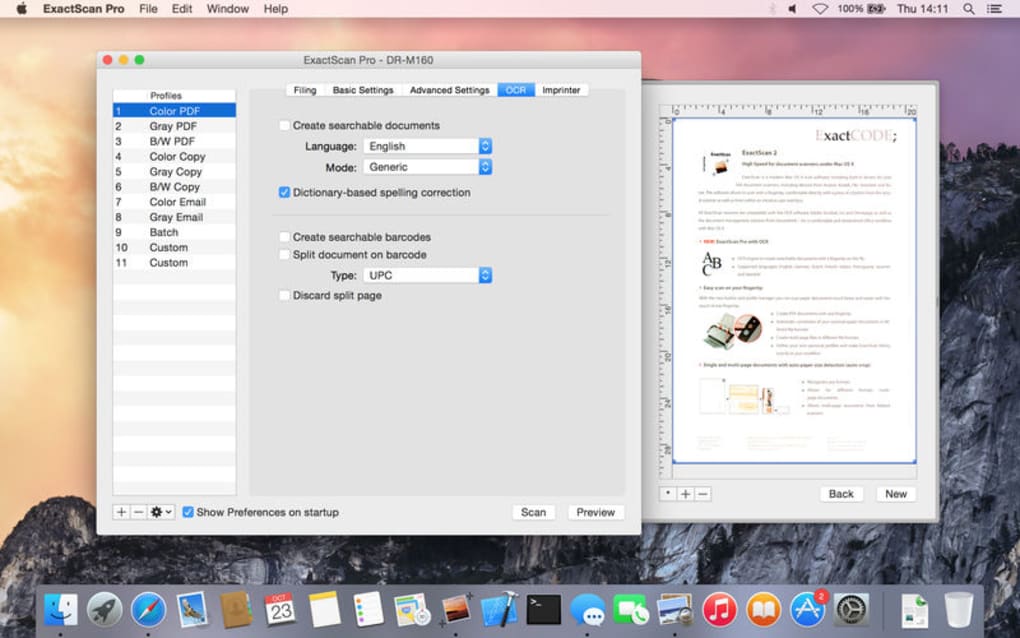
The software shines most in its OCR (Optical Character Recognition) engine, delivering high‑precision text extraction from scanned PDFs, RTF files, or image formats. Whether you need to convert a stack of printed invoices into searchable PDFs or archive historical records as editable text, ExactScan Pro offers granular control over output formats, page handling, and post‑scan processing. It also intelligently skips blank pages, reducing file size and saving storage space.
For power users, the integration with AppleScript on macOS opens a world of automation, allowing you to script batch scans, rename files, or adjust settings without touching the UI. While free competitors such as Wondershare provide basic scanning, they often lack the depth of customization and reliability that a paid‑for tool like ExactScan Pro delivers. In short, ExactScan Pro is built for professionals, small businesses, and anyone who values a seamless, accurate, and secure scanning workflow.
Key Features
- Automatic scanner detection – works with the majority of USB and network scanners.
- High‑accuracy OCR engine supporting over 30 languages.
- Multiple output formats: PDF, PDF/A, RTF, TXT, JPEG, PNG, and searchable PDF.
- Blank‑page detection and removal to keep files lean.
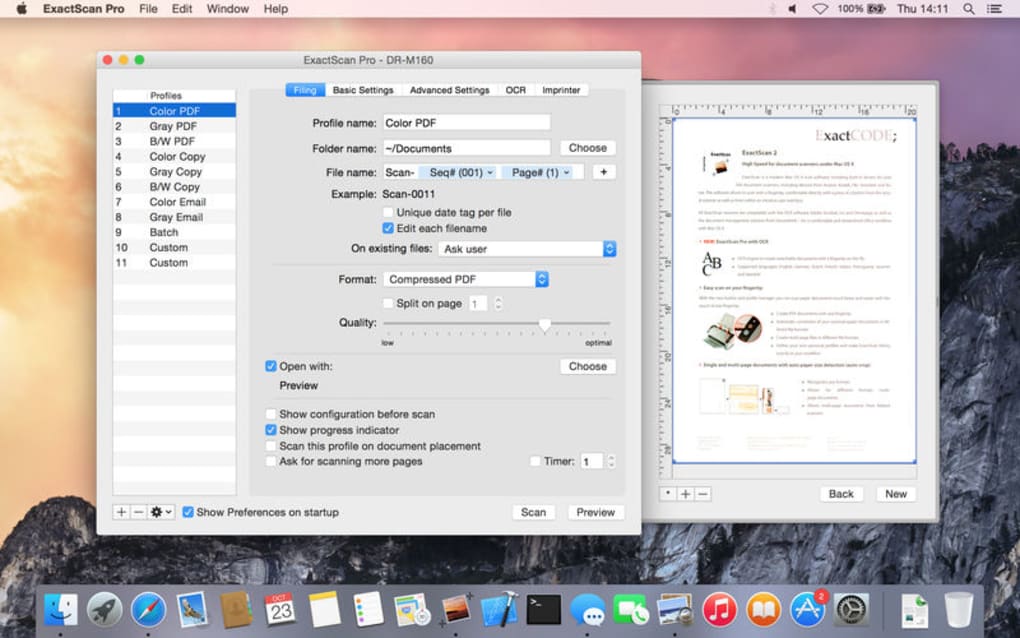
- Batch scanning with custom naming conventions.
- AppleScript support for macOS automation.
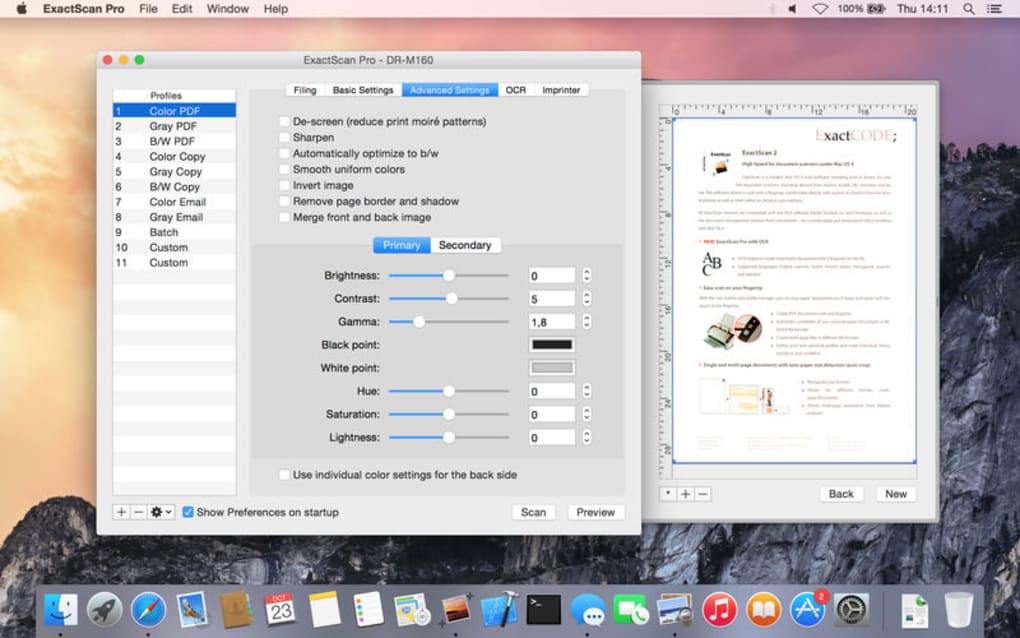
- Adjustable image enhancement settings (brightness, contrast, despeckle).
- Secure PDF encryption and password protection.
- Direct upload to cloud services (Dropbox, Google Drive, OneDrive).
- Regular updates and priority technical support for licensed users.
Installation & Usage Instructions
Installing ExactScan Pro is straightforward and mirrors the simplicity the software promises during scanning. Begin by purchasing a license from the official website; a license key will be emailed instantly. Download the installer compatible with your operating system (Windows, macOS, or Linux via Wine).
Run the executable and follow the on‑screen prompts: accept the EULA, choose an installation folder, and let the wizard copy files. Once installed, launch ExactScan Pro. The first launch triggers a one‑time activation where you paste the license key.
After activation, the program scans for attached scanners; if your device is supported, it appears in the drop‑down menu automatically.
To start a scan, place your documents in the feeder, select the desired scanner from the list, and choose an output format. For OCR, tick the “Enable OCR” box and pick the language. Advanced users can click “Settings” to fine‑tune resolution, color mode, and image preprocessing. If you prefer automation, open the AppleScript editor (macOS only) and use the built‑in script templates to create custom workflows—such as scanning a folder of receipts nightly and saving them to a secure PDF archive.
After scanning, the preview window lets you rotate, crop, or reorder pages before saving. The software also offers a “Scan to Cloud” button, which automatically uploads the final file to your chosen cloud provider, applying encryption if required. Finally, keep ExactScan Pro up to date by enabling automatic updates; the program checks for patches weekly and prompts you to install them, ensuring you always have the latest OCR algorithms and driver compatibility fixes.
Compatibility & System Requirements
ExactScan Pro is built to run on the most common desktop environments. The official builds support:
- Windows 10, Windows 11 (64‑bit)
- macOS 10.15 Catalina and later (including Apple Silicon with Rosetta 2)
- Linux users can run the Windows version via Wine 7.0+ (though native support is not officially listed).
Minimum hardware specifications include a dual‑core processor (Intel i3 or AMD equivalent), 4 GB RAM, and 200 MB of free disk space for the application itself. For optimal OCR performance, especially with high‑resolution scans, a 64‑bit CPU with at least 8 GB RAM is recommended. The software works with any TWAIN‑compatible scanner; a short compatibility list on the product page highlights the most frequently tested models. If your scanner is not auto‑detected, you can manually add the driver path within the Settings menu.
Security‑conscious users will appreciate that ExactScan Pro does not collect personal documents or scan data. All processing occurs locally on your machine, and any cloud uploads are encrypted with AES‑256. The application also complies with GDPR and CCPA standards, making it suitable for corporate environments that handle sensitive information.
Pros, Cons & Frequently Asked Questions
Pros
- Seamless automatic scanner detection eliminates driver headaches.
- Industry‑leading OCR accuracy across multiple languages.
- Extensive output options, including secure, encrypted PDFs.
- Automation via AppleScript for macOS power users.
- Regular updates and dedicated premium support.
Cons
- Paid license may be a barrier for casual home users.
- Linux support relies on Wine, which may not be ideal for all.
- Very old or niche scanner models may lack native compatibility.
Frequently Asked Questions
Is ExactScan Pro compatible with my existing scanner?
ExactScan Pro works with any TWAIN‑compatible scanner. During the first launch, the software automatically scans for connected devices. If your scanner is not listed, you can manually add the driver path in the Settings menu. A compatibility list is maintained on the official website, covering most major brands.
How accurate is the OCR engine compared to free alternatives?
ExactScan Pro’s OCR engine achieves over 98 % accuracy on clean, high‑resolution scans, outperforming many free tools that often hover around 90‑93 %. The engine also includes language detection and can process complex layouts, tables, and mixed fonts with minimal errors.
Can I automate batch scans on macOS?
Yes. ExactScan Pro includes AppleScript support, allowing you to write scripts that control scan parameters, file naming, and post‑processing actions. Sample scripts are provided in the Help menu, and the community forum shares additional examples.
Is my scanned data secure when using cloud upload?
All cloud uploads are encrypted with AES‑256 before transmission. You can also set a password on PDF files, ensuring that only authorized recipients can view the content. ExactScan Pro does not store any of your documents on its servers.
What is the refund policy if I’m not satisfied?
The vendor offers a 30‑day money‑back guarantee. If the software does not meet your expectations, you can request a full refund within 30 days of purchase by contacting support with your license details.
Overall Rating: 4.7 / 5
Pros: Automatic scanner detection, superior OCR accuracy, robust automation, secure PDF handling.
Cons: Paid license, limited native Linux support, rare scanner incompatibility.
Conclusion & Call to Action
ExactScan Pro stands out as a polished, reliable, and feature‑rich scanning solution for anyone who needs to turn paper into searchable digital assets quickly. Its automatic driver handling removes a common pain point, while the high‑precision OCR engine ensures that the resulting text is ready for editing or indexing without extensive manual correction. The inclusion of AppleScript automation and secure cloud integration makes it a versatile tool for both solo professionals and small teams. Although the price tag may deter occasional users, the time saved, improved accuracy, and peace of mind regarding data security justify the investment for businesses and power users alike. If you’re ready to upgrade your scanning workflow, download ExactScan Pro today and experience the difference of a truly professional scanning suite.







